

Monitor Your Devices with the New ScanTrip Cloud MFP Dashboard

The MFP Dashboard is now available in Dispatcher ScanTrip Cloud, at no additional cost. This feature adds real-time monitoring of MFP availability and device conditions directly inside the STC portal for anywhere, anytime access. At the same time, IT and service teams can monitor the health of every device in one place and identify potential issues early. By centralizing device information in one place, the dashboard helps organizations stay informed, reduce interruptions, and keep devices available for everyday use.
What's Included
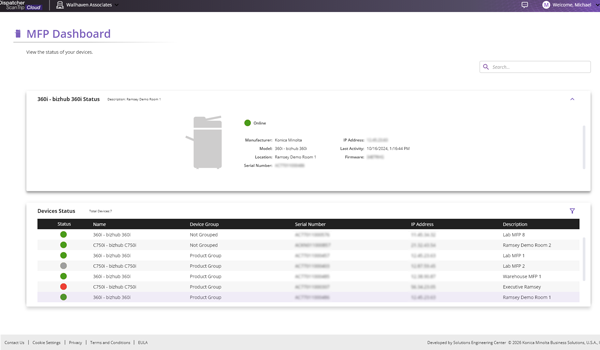
The MFP Dashboard displays essential device details such as manufacturer, model, location, serial number, IP address, firmware version, and last connection. It also provides clear visual indicators for device status so users can quickly understand whether a machine is ready, offline, or reporting an issue.
Filter and Search
The MFP Dashboard includes flexible filtering options to help users focus on the devices that matter most.
Users can also filter devices by status, allowing quick identification of devices that are available for printing, offline or may have an error that needs to be resolved. This helps users make quick decisions about which device they can use when they are in a hurry.
Only devices that match the selected criteria are shown in the table. A search field is also available, allowing users to quickly find devices by name, group, or other visible attributes.
Upgrade to Dispatcher Stratus for Advanced Features
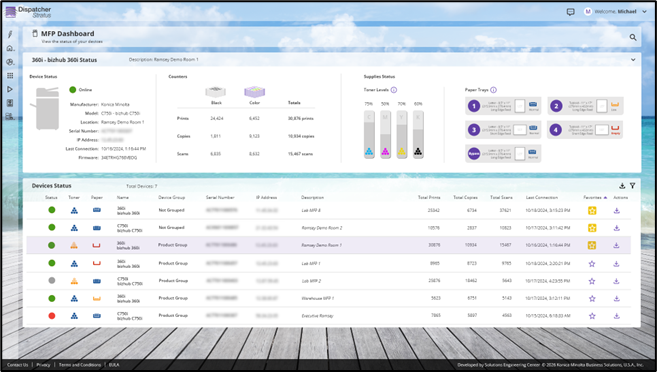
For organizations looking for deeper visibility and control, upgrading to Dispatcher Stratus unlocks additional capabilities. With Stratus, users can monitor toner levels, paper tray status, and device usage counters such as print, copy, and scan volumes. Teams can also create device favorites for quick access to the devices they frequently use, and configure notification alerts to stay informed when devices go offline, run low on supplies, or require attention.
These advanced features help teams move from basic monitoring to advanced fleet monitoring, improving uptime and reducing the need for manual checks.
Get Started Today
The MFP Dashboard is now included with Dispatcher ScanTrip Cloud at no additional cost for supported Konica Minolta devices. Contact your account representative to learn about the MFP Dashboard and explore how upgrading to Dispatcher Stratus can provide even greater visibility and control.
 Previous Article